> ## Documentation Index
> Fetch the complete documentation index at: https://portkey-docs-feature-comparison-update.mintlify.site/llms.txt
> Use this file to discover all available pages before exploring further.
# MCP Gateway
> Centralized authentication, access control, and observability for MCP servers.
The MCP Gateway is Portkey's solution for managing access to MCP servers. It acts as a proxy between MCP Clients and MCP servers, handling authentication, access control, and logging.
When connecting to MCP servers directly, each agent needs its own credentials and configuration for every server. With the MCP Gateway, clients authenticate once to Portkey. The Gateway handles credential injection, permission checks, and request logging for all configured servers.
Add an MCP server and connect an MCP client in 5 minutes.
Connect Claude Desktop, Cursor, VS Code, or custom agents.
***
## How It Works
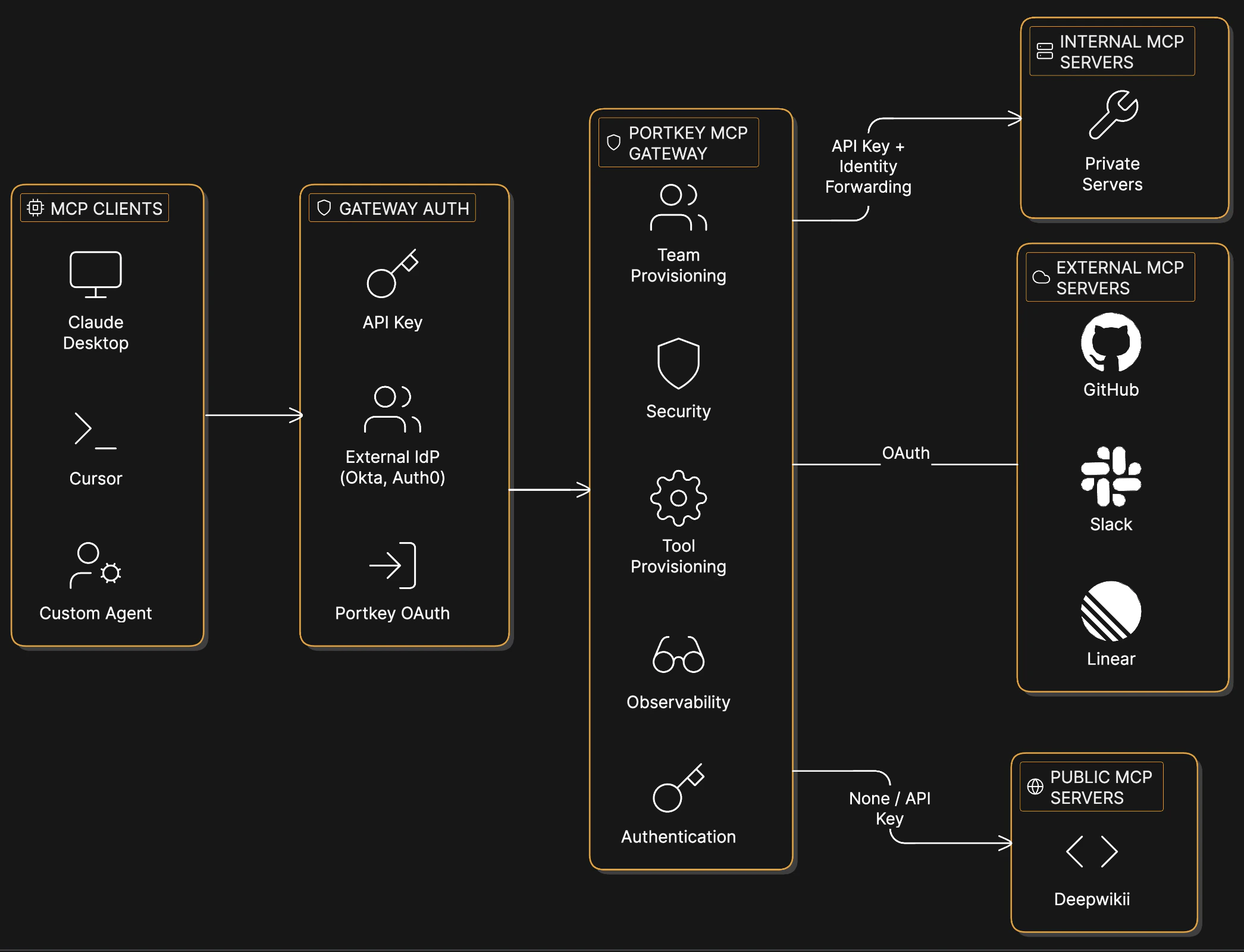 When an AI Agent/MCP Client calls an MCP tool, the request flows through Portkey. The Gateway authenticates the request using the agent's API key (or IdP token), checks whether that user has access to the requested server and tool, then injects the appropriate credentials for the upstream server—OAuth tokens for services like GitHub and Slack, API keys for public servers, or identity headers for internal servers. The request is proxied to the MCP server, and the full request/response is logged.
This gives platform teams complete visibility into MCP usage—who accessed what, when, and with what parameters—while developers get access to tools without managing credentials or requesting permissions for each server.
***
## Capabilities
Configure OAuth, API keys, or custom headers per server. Supports external IdPs like Okta and Auth0.
Control which workspaces and users can access each server.
Enable or disable specific tools per user when a server exposes tools that shouldn't be available to everyone.
Every tool call logged with user, parameters, and response. Filter by server, user, or time range.
Rate limits, content filters, and approval workflows per server.
***
## Usage
Add an MCP server to your organization's registry, configure its authentication, and provision access to workspaces. Then connect any MCP client to Portkey's endpoint:
```json theme={null}
{
"mcpServers": {
"portkey": {
"url": "https://mcp.portkey.ai/{server-slug}/mcp",
"headers": {
"Authorization": "Bearer YOUR_API_KEY"
}
}
}
}
```
The API key determines which servers and tools are accessible. See [Integrations](/product/mcp-gateway/integrations) for setup guides for Claude Desktop, Cursor, VS Code, and custom agents.
***
## MCP Registry
The MCP Registry is where MCP servers are configured and managed. Add servers, set up authentication, and control which workspaces can access them.
Add servers, configure authentication, and manage access.
**For platform teams:**
* Add MCP servers (external services, internal APIs, or public servers)
* Configure authentication (OAuth, API keys, custom headers)
* Provision access to specific workspaces
* View usage across the organization
**For developers:**
* Browse available servers and tools in your workspace
* Copy connection URLs
* Test tools directly from the UI
When an AI Agent/MCP Client calls an MCP tool, the request flows through Portkey. The Gateway authenticates the request using the agent's API key (or IdP token), checks whether that user has access to the requested server and tool, then injects the appropriate credentials for the upstream server—OAuth tokens for services like GitHub and Slack, API keys for public servers, or identity headers for internal servers. The request is proxied to the MCP server, and the full request/response is logged.
This gives platform teams complete visibility into MCP usage—who accessed what, when, and with what parameters—while developers get access to tools without managing credentials or requesting permissions for each server.
***
## Capabilities
Configure OAuth, API keys, or custom headers per server. Supports external IdPs like Okta and Auth0.
Control which workspaces and users can access each server.
Enable or disable specific tools per user when a server exposes tools that shouldn't be available to everyone.
Every tool call logged with user, parameters, and response. Filter by server, user, or time range.
Rate limits, content filters, and approval workflows per server.
***
## Usage
Add an MCP server to your organization's registry, configure its authentication, and provision access to workspaces. Then connect any MCP client to Portkey's endpoint:
```json theme={null}
{
"mcpServers": {
"portkey": {
"url": "https://mcp.portkey.ai/{server-slug}/mcp",
"headers": {
"Authorization": "Bearer YOUR_API_KEY"
}
}
}
}
```
The API key determines which servers and tools are accessible. See [Integrations](/product/mcp-gateway/integrations) for setup guides for Claude Desktop, Cursor, VS Code, and custom agents.
***
## MCP Registry
The MCP Registry is where MCP servers are configured and managed. Add servers, set up authentication, and control which workspaces can access them.
Add servers, configure authentication, and manage access.
**For platform teams:**
* Add MCP servers (external services, internal APIs, or public servers)
* Configure authentication (OAuth, API keys, custom headers)
* Provision access to specific workspaces
* View usage across the organization
**For developers:**
* Browse available servers and tools in your workspace
* Copy connection URLs
* Test tools directly from the UI