> ## Documentation Index
> Fetch the complete documentation index at: https://portkey-docs-feature-comparison-update.mintlify.site/llms.txt
> Use this file to discover all available pages before exploring further.
# Function Calling
> Get the LLM to interact with external APIs!
As described in the [Enforcing JSON Schema cookbook](/guides/use-cases/enforcing-json-schema-with-anyscale-and-together), LLMs are now good at generating outputs that follow a specified syntax. We can combine this LLM ability with their reasoning ability to let LLMs interact with external APIs. **This is called Function (or Tool) calling.** In simple terms, function calling:
1. Informs the user when a question can be answered using an external API
2. Generates a valid request in the API's format
3. Converts the API's response to a natural language answer
Function calling is currently supported on select models on **Anyscale**, **Together AI**, **Fireworks AI**, **Google Gemini**, and **OpenAI**. Using Portkey, you can easily experiment with function calling across various providers and gain confidence to ship it to production.
**Let's understand how it works with an example**:
We want the LLM to tell what's the temperature in Delhi today. We'll use a "Weather API" to fetch the weather:
```js theme={null}
import Portkey from "portkey-ai";
const portkey = new Portkey({
apiKey: "PORTKEY_API_KEY",
provider: "@anyscale-prod",
});
// Describing what the Weather API does and expects
let tools = [
{
"type": "function",
"function": {
"name": "getWeather",
"description": "Get the current weather in a given location",
"parameters": {
"type": "object",
"properties": {
"location": {
"type": "string",
"description": "The city and state",
},
"unit": {"type": "string", "enum": ["celsius", "fahrenheit"]},
},
"required": ["location"],
},
},
}
];
let response = await portkey.chat.completions.create({
model: "mistralai/Mixtral-8x7B-Instruct-v0.1",
messages: [
{"role": "system", "content": "You are helpful assistant."},
{"role": "user", "content": "What's the weather like in Delhi - respond in JSON"}
],
tools,
tool_choice: "auto", // auto is default, yet explicit
});
console.log(response.choices[0].finish_reason)
```
Here, we've defined what the Weather API expects for its requests in the `tool` param, and set `tool_choice` to auto. So, based on the user messages, the LLM will decide if it should do a function call to fulfill the request. Here, it will choose to do that, and we'll see the following output:
```json theme={null}
{
"role": "assistant",
"content": null,
"tool_calls": [{
"id": "call_x8we3xx",
"type": "function",
"function": {
"name": "getWeather",
"arguments": "{\"location\": \"Delhi, India\", \"format\": \"celsius\"}"
}
}]
}
```
We can just take the `tool_call` made by the LLM, and pass it to our `getWeather` function - it should return a proper response to our query. We then take that response and send it to our LLM to complete the loop:
```js theme={null}
// getWeather(..) is a utility to call external weather service APIs
// Responds with: {"temperature": 20, "unit": "celsius"}
let weatherData = await getWeather(JSON.parse(arguments));
let content = JSON.stringify(weatherData);
// Push assistant and tool message from earlier generated function arguments
messages.push(assistantMessage);
messages.push({
role: "tool",
content: content,
toolCallId: "call_x8we3xx",
name: "getWeather"
});
let response = await portkey.chat.completions.create({
model: "mistralai/Mixtral-8x7B-Instruct-v0.1",
tools: tools,
messages: messages,
tool_choice: "auto"
});
```
We should see this final output:
```json theme={null}
{
"role": "assistant",
"content": "It's 30 degrees celsius in Delhi, India."
}
```
## Function Calling Workflow
Recapping, there are 4 key steps to doing function calling, as illustrated below:
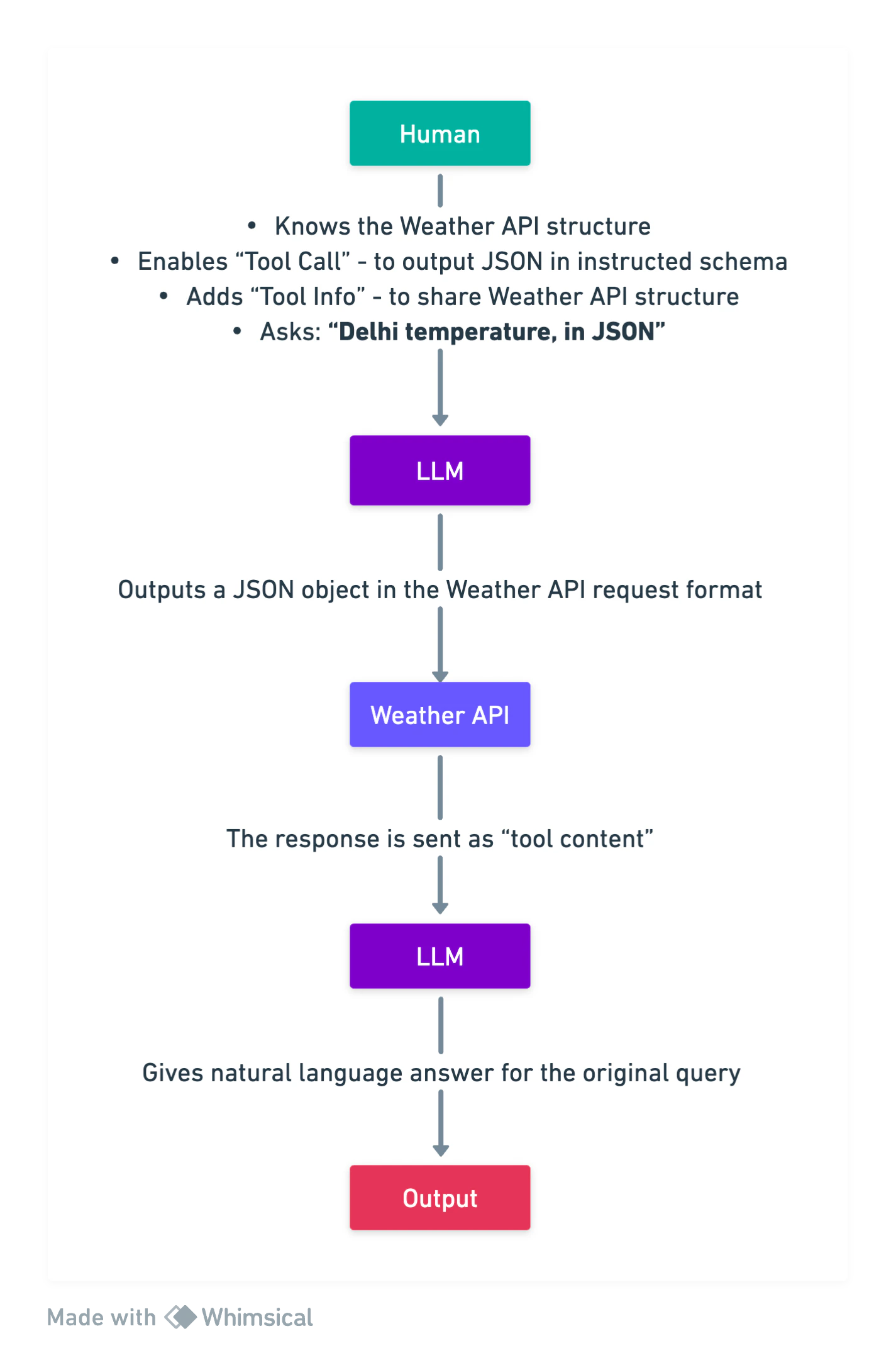 Function Calling Workflow
## Supporting Models
Portkey's AI Gateway provides native function calling (also known as tool calling) support across our entire ecosystem of AI providers, including OpenAI, Anthropic, Google, Together AI, Fireworks AI, and many more. If you discover a function-calling capable LLM that isn't working with Portkey, please let us know [on Discord](https://portkey.wiki/community).
Portkey also supports parallel tool calling when available from the provider. This feature allows you to submit multiple requests in a single query. The model automatically selects the appropriate tool for each request and returns an array of `tool_calls`, each with a unique identifier. For more details, see the [parallel function calling documentation](https://platform.openai.com/docs/guides/function-calling/parallel-function-calling).
Function Calling Workflow
## Supporting Models
Portkey's AI Gateway provides native function calling (also known as tool calling) support across our entire ecosystem of AI providers, including OpenAI, Anthropic, Google, Together AI, Fireworks AI, and many more. If you discover a function-calling capable LLM that isn't working with Portkey, please let us know [on Discord](https://portkey.wiki/community).
Portkey also supports parallel tool calling when available from the provider. This feature allows you to submit multiple requests in a single query. The model automatically selects the appropriate tool for each request and returns an array of `tool_calls`, each with a unique identifier. For more details, see the [parallel function calling documentation](https://platform.openai.com/docs/guides/function-calling/parallel-function-calling).